




登 录
注册
Search
标签搜索
技术教程
typecho
JavaScript
成长日记
Joe主题
Typecho主题
前端学习
网站搭建
typecho函数
影视分享
情感
css
帮助文档
虚拟机
服务器
typecho编辑器
插件
Linux
typecho插件
Windows
Brains - 灵感乌托邦
累计撰写
81
篇文章
累计收到
4,296
条评论
文章首页
分类栏目
技术教程
Typecho
程序代码
学习笔记
Web前端
CSS
JavaScript
其他文章
生活
独立页面
胡言乱语
生活吐槽
友情链接
网站统计
关于博主
自建图床
自建网盘
博主推荐
灵感宝物库
灵感图床库
Code-Server
在线工具箱
TypechoDoc
在线转换
灵感导航页
登录
丨
注册
typecho函数
(共
5
篇)
搜索到
5
篇与
typecho函数
的结果
『笔记』『学习』Typecho常量
Typecho常量,在 config.inc.php 最后面插入一行代码就可以启动一些功能或者重新定义一些参数,在 config.inc.php 中加是全局生效的,不在 config.inc.php 中其实也可以生效,只是在你加的位置那个局部生效。debug模式平时不建议开启,遇到报错或者开发东西时最好开启,可以看到更详细的报错define('__TYPECHO_DEBUG__', true);强制https当你用https的时候typecho会自动识别的,但是因为大家的环境千差万别,会有识别错误的情况,比如你https都布置好了,但是程序依旧只会加载http的,所以该常量的作用就是强制程序使用https,解决识别错误的情况。define('__TYPECHO_SECUER__', true);公共头像地址替换Typecho用的GRAVATR的公共头像地址,GRAVATR的服务器在美国,虽然它在全世界做镜像,但是在国内依旧很慢。然后发现有国内有很多人为其做反向代理,把头像缓存到本地,来提高速度,以前大家可能会使用插件来替换Typecho的GRAVATR的默认地址,实际上不需要,我们用这个常量就可以了,比如我们替换成 https://gravatar.cat.net/avatar/ ,用法如下 用法 在config.inc.php最后面插入 define('__TYPECHO_GRAVATR_PREFIX__', 'https://gravatar.cat.net/avatar'); 这样一来typecho就会替换成 https://gravatar.cat.net/avatar/ 渠道的头像地址。【有些模板可能不支持】后台路径自定义后台路径字定义,用于修改程序后台地址,提高安全性。 typecho默认后台地址是admin,如果我们想改成typecho-admin,那么首先登陆服务器把admin文件夹名字改成typecho-admin。 然后在config.inc.php找到define('__TYPECHO_ADMIN_DIR__', '/admin/');将其中的admin改成typecho-admin即可。自定义上传附件目录可以单独定义一个不在typecho下的附件上传地址 存储到这里有什么用呢? 在config.inc.php最后面插入define('__TYPECHO_UPLOAD_DIR__', '/www/static'); define('__TYPECHO_UPLOAD_URL__', 'https://xxxxx.upyun.com');开启动态域名如果你站绑定了多个域名,可能非后台设置的域名访问会出现跨域加载问题,可以使用他开启动态域名,这样就可以使用多个域名绑定在同一个站点了define('__TYPECHO_DYNAMIC_SITE_URL__',true);
2024年01月18日
3,578 阅读
2 评论
6 点赞
2024-01-18
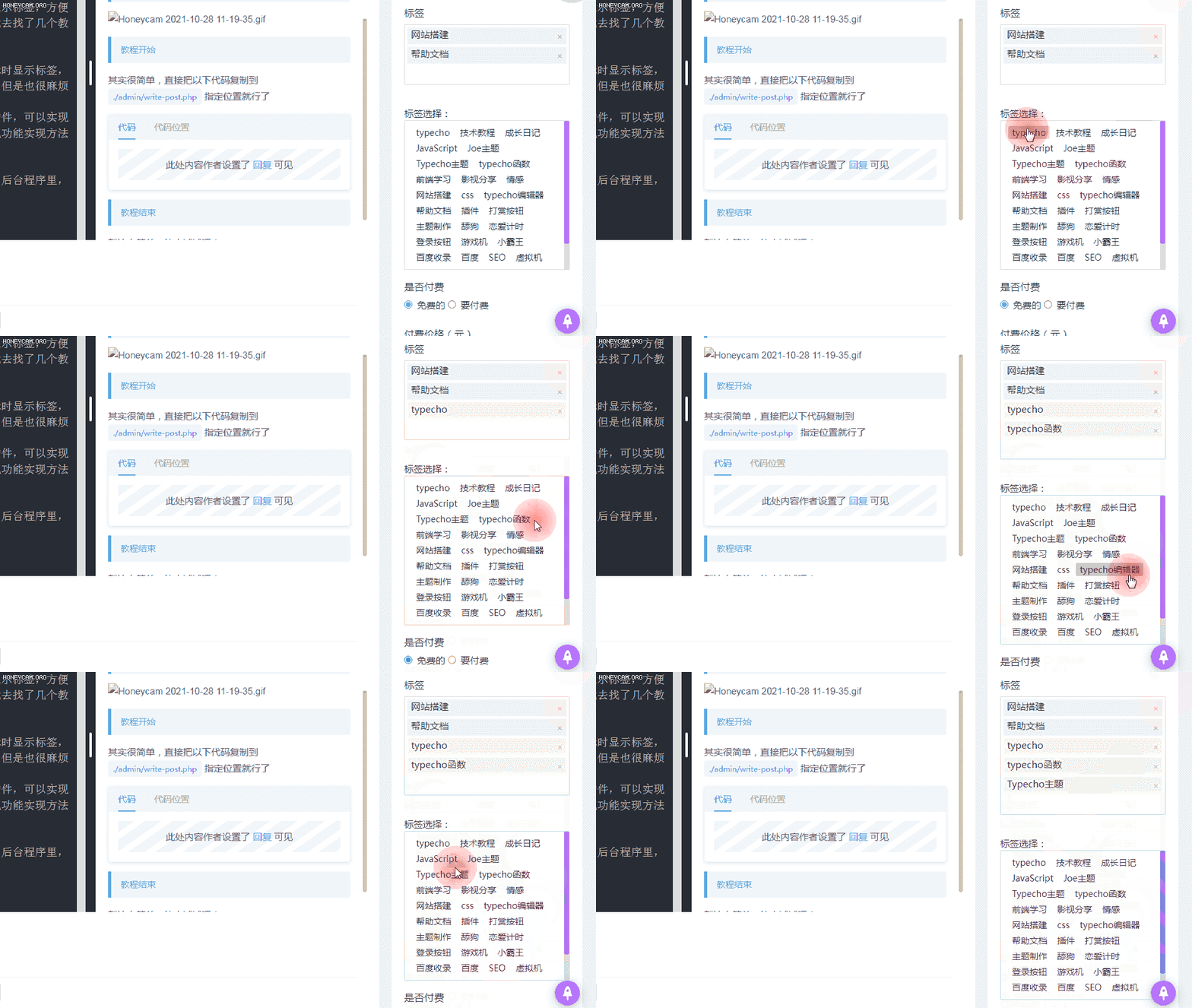
『原创』『教程』Typecho后台撰写文章时插入标签(非插件)
每次写文章的时候,都忘记填写标签,因为typecho的标签默认不在后台展示,配置了哪些标签也很容易忘记。
2021年10月28日
14,808 阅读
114 评论
29 点赞
2021-10-28
『原创』『教程』首页及文章页滚动广告栏
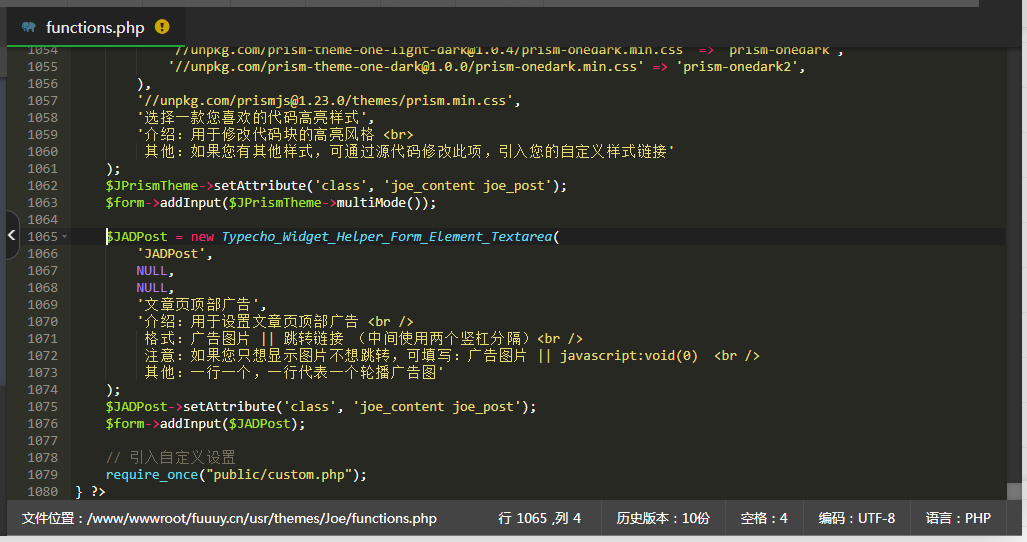
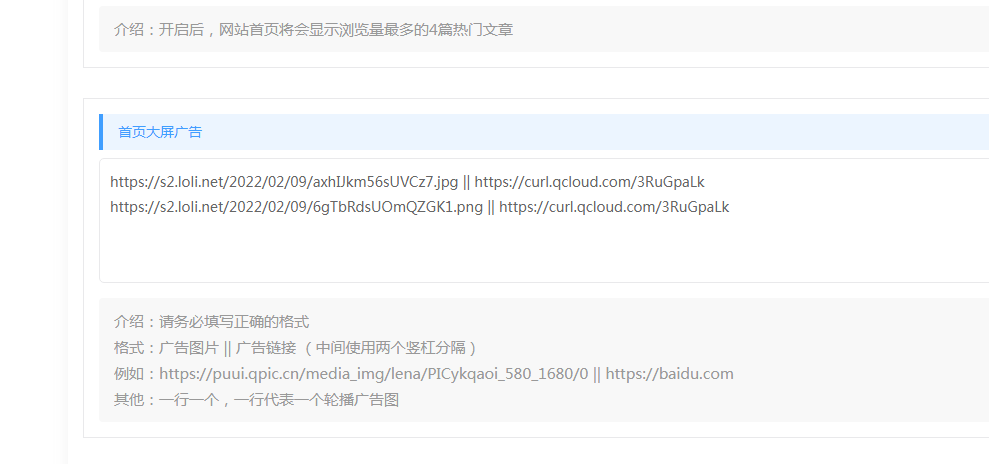
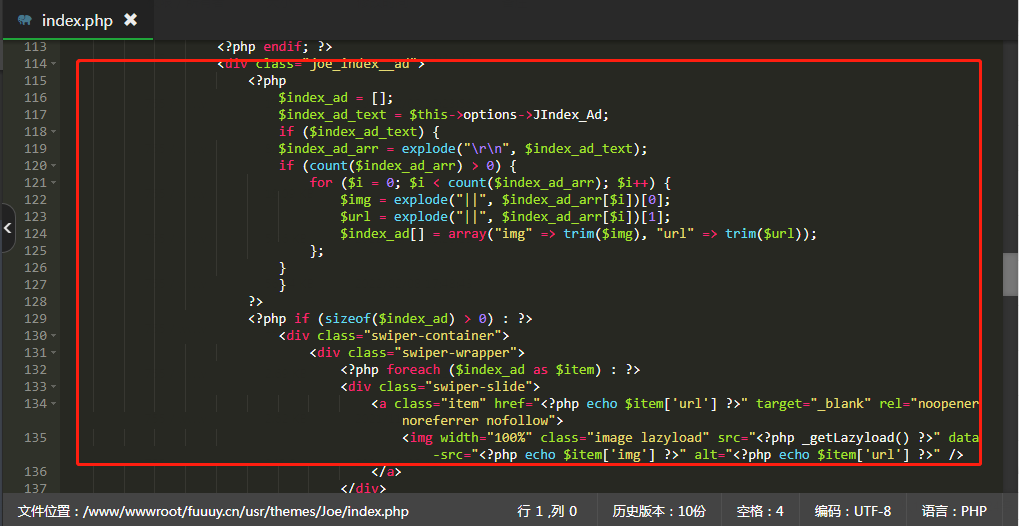
前言因为之前在很多网站上都能看到广告,虽然但是,这对很多博主来说也是一笔额外的收入,我一直是入不敷出!:@(吐血倒地) 然后我看到了执念博客的首页广告栏,虽然曝光确实大,但是用户体验极其不好,因为要翻很多广告才能翻到文章,就像这样:所以我就想到了滚动广告,一个广告的位置,能够显示多条广告成果展示{tabs}{tabs-pane label="首页"}{/tabs-pane}{tabs-pane label="文章页"}{/tabs-pane}{/tabs}教程开始灵感及相关代码来自于Joe主题的首页轮播图一、添加后台打开 functions.php 添加以下代码{tabs}{tabs-pane label="代码"}$JADPost = new Typecho_Widget_Helper_Form_Element_Textarea( 'JADPost', NULL, NULL, '文章页顶部广告', '介绍:用于设置文章页顶部广告 <br /> 格式:广告图片 || 跳转链接 (中间使用两个竖杠分隔)<br /> 注意:如果您只想显示图片不想跳转,可填写:广告图片 || javascript:void(0) <br /> 其他:一行一个,一行代表一个轮播广告图' ); $JADPost->setAttribute('class', 'joe_content joe_post'); $form->addInput($JADPost);{/tabs-pane}{tabs-pane label="代码位置"}因为有位小伙伴放错了位置,所以再贴一张图{/tabs-pane}{/tabs}这是文章页的代码,因为首页广告主题自带了二、添加滚动广告栏{tabs}{tabs-pane label="首页"} 因为首页已经有广告位了,所以直接替换就行了将主题 index.php 的以下代码直接替换为新代码{collapse}{collapse-item label="代码位置" open}{/collapse-item}{collapse-item label="新代码" open}隐藏内容,请前往内页查看详情{/collapse-item}{/collapse}{/tabs-pane}{tabs-pane label="文章页"}文章页直接在主题的 post.php 文件内合适的地方加入以下代码{collapse}{collapse-item label="代码位置" open}{/collapse-item}{collapse-item label="代码" open}隐藏内容,请前往内页查看详情{/collapse-item}{/collapse}{/tabs-pane}{/tabs}三、修改广告栏样式{tabs}{tabs-pane label="首页"} 直接在 Joe/assets/css 打开 joe.index.min.css 然后在最后添加以下代码.joe_index__ad .swiper-container{height: 180px!important;border-radius: var(--radius-inner);}.joe_index__ad .swiper-container .icon{position:absolute;z-index:1;top:10px;right:10px;font-size:12px;background:rgba(0,0,0,0.25);padding:2px 5px;border-radius:2px;color:#ebebeb;pointer-events:none}@media (max-width: 768px){.joe_index__ad .swiper-container{height: 120px!important}.joe_index__ad .swiper-container .image{height: 120px;object-fit: cover;border-radius: var(--radius-inner);}}{/tabs-pane}{tabs-pane label="文章页"}直接在 Joe/assets/css 打开 joe.post.min.css 然后在最后添加以下代码.joe_post__ad .swiper-container{height: 180px!important;margin-top:15px;border-radius: var(--radius-inner);}.joe_post__ad .swiper-container .icon{position:absolute;z-index:1;top:10px;right:10px;font-size:12px;background:rgba(0,0,0,0.25);padding:2px 5px;border-radius:2px;color:#ebebeb;pointer-events:none}@media (max-width: 768px){.joe_post__ad .swiper-container{height: 120px!important}.joe_post__ad .swiper-container .image{height: 120px;object-fit: cover;border-radius: var(--radius-inner);}}{/tabs-pane}{/tabs}四、添加滚动效果{tabs}{tabs-pane label="首页"}首页因为引入了滚动效果,所有不需要设置,会直接调用首页轮播图的滚动效果但是会根据首页轮播图的滚动方式滚动,效果不太好,暂时没想到比较好的解决方法{/tabs-pane}{tabs-pane label="文章页"}首先在主题的 post.php 文件内 <head>标签内加入以下代码<link rel="stylesheet" href="https://cdn.jsdelivr.net/npm/swiper@5.4.5/css/swiper.min.css" /> <script src="https://cdn.jsdelivr.net/npm/swiper@5.4.5/js/swiper.min.js"></script>然后再在 Joe/assets/js 打开 joe.post_page.min.js 然后在最后添加以下代码if(0!==$(".joe_post__ad .swiper-container").length){let e="vertical";new Swiper(".swiper-container",{keyboard:!1,direction:e,loop:!0,autoplay:!0,mousewheel:!0,pagination:{el:".swiper-pagination"},})}添加位置{/tabs-pane}{/tabs}教程结束大功告成,快刷新你的网站看看效果吧!
2021年10月15日
33,678 阅读
77 评论
898 点赞
2021-10-15
『转载』『代码』Typecho自定义调用如热门文章随机文章等
Typecho自定义调用这是面向模板开发者的一篇干货文章,通过学习下面的两个事例,你可以通过调整数据库语句来实现自定义调用文章,如随机文章等。调用热门文章在 functions.php 中加入如下代码class Widget_Post_hot extends Widget_Abstract_Contents { public function __construct($request, $response, $params = NULL) { parent::__construct($request, $response, $params); $this->parameter->setDefault(array('pageSize' => $this->options->commentsListSize, 'parentId' => 0, 'ignoreAuthor' => false)); } public function execute() { $select = $this->select()->from('table.contents') ->where("table.contents.password IS NULL OR table.contents.password = ''") ->where('table.contents.status = ?','publish') ->where('table.contents.created <= ?', time()) ->where('table.contents.type = ?', 'post') ->limit($this->parameter->pageSize) ->order('table.contents.views', Typecho_Db::SORT_DESC); $this->db->fetchAll($select, array($this, 'push')); $db = Typecho_Db::get(); } }前台调用文章<?php $this->widget('Widget_Post_hot@hot', 'pageSize=6')->to($hot); ?> <?php while($hot->next()): ?> 文章链接:<?php $hot->permalink() ?> 文章标题:<?php $hot->title(); ?> 文章缩略图:<?php $hot->fields->img(); ?> <!--等等--> <?php endwhile; ?>这种写法非常原生,使用方法也同typecho调用某分类下的文章语法一致调用指定文章集合在 functions.php 中加入如下代码class Widget_Post_fanjubiao extends Widget_Abstract_Contents { public function __construct($request, $response, $params = NULL) { parent::__construct($request, $response, $params); $this->parameter->setDefault(array('pageSize' => $this->options->commentsListSize, 'parentId' => 0, 'ignoreAuthor' => false)); } public function execute() { $select = $this->select()->from('table.contents') ->where("table.contents.password IS NULL OR table.contents.password = ''") ->where('table.contents.type = ?', 'post') ->limit($this->parameter->pageSize) ->order('table.contents.modified', Typecho_Db::SORT_DESC); if ($this->parameter->fanjubiao) { $fanju=explode(",",$this->parameter->fanjubiao); $select->where('table.contents.cid in ?', $fanju); } $this->db->fetchAll($select, array($this, 'push')); } }前台调用<?php $week1="728,1197";//指定文章id集合多个文章中间用英文逗号隔开 $this->widget('Widget_Post_fanjubiao@fanjubiao', 'fanjubiao='.$week1)->to($fanju); ?> <?php while($fanju->next()): ?> 文章链接:<?php $fanju->permalink() ?> 文章标题:<?php $fanju->title(); ?> <!--等等--> <?php endwhile; ?>总结这样的写法只要懂得数据库语句,就可以定制各种自己所需的调用文章!语法贴近原生且内部支持调用各种函数,比如缩略图函数等等!
2021年10月03日
4,659 阅读
0 评论
9 点赞
2021-10-03
『笔记』『代码』Typecho 主题模版制作常用调用变量和函数、参数
前言博主对Typecho博客程序情有独钟,但是还不会PHP所以四处收集Typecho制作模板的代码和函数什么的。一个是方便自己使用,另外一个方便大家查看,又找到了点代码,今天发一下。修改 Typecho 主题时,需要判断当前用户角色,对于管理员角色,显示内容,可使用如下:<?php $currGroup = get_object_vars($this->user) ['row']['group'];if ($currGroup == "administrator"): ?> 若为管理员,显示此区域内容 <?php else: ?>//else可去 非管理员,显示此区域内容 <?php endif;?>登录<?php $this->options->adminUrl('login.php'); ?>注册<?php $this->options->adminUrl('register.php'); ?>站点名称<?php $this->options->title(); ?>域名地址<?php $this->options->siteUrl(); ?>后台地址<?php $this->options->adminUrl(); ?>完整路径标题,比如 文章 站点<?php $this->archiveTitle(' » ', '', ' - '); ?><?php $this->options->title(); ?>站点说明<?php $this->options->description(); ?>模版文件夹地址<?php $this->options->themeUrl(); ?>作者名字<?php $this->author(); ?>当前登陆用户名字<?php $this->user->screenName(); ?>退出链接<a href="<?php $this->options->logoutUrl(); ?>" ><?php _e('退出');?></a>作者头像<?php $this->author->gravatar('200') ?> 参数说明 此函数是完整 img 标签,200代表长和宽 该文作者全部文章列表链接<?php $this->author->permalink(); ?>该文作者个人主页链接<?php $this->author->url(); ?>该文作者的邮箱地址<?php $this->author->mail(); ?>引用模版文件夹内php文件<?php $this->need('*.php'); ?> 参数说明 可以使用相对路径获取上级目录php文件 评论<?php $this->options->commentsFeedUrl(); ?>常用调用代码:/*头部HEAD常用 <?php $this->keywords('_'); ?>//关键词 <?php $this->options->title(); ?>//站点名称 <?php $this->options->description(); ?>//站点描述 <?php $this->archiveTitle(); ?>//标题 <?php $this->options->themeUrl('ie.css'); ?>//模板路径 <?php $this->options->siteUrl(); ?>//主页网址 <?php $this->options->feedUrl(); ?> <?php $this->options->commentsFeedUrl(); ?> <?php $this->pageNav(); ?>//分页 <?php $this->options->generator(); ?>//版本号 /*文章页面常用 <?php $this->title(); ?>//标题 <?php $this->category(','); ?>//分类 <?php $this->tags(', ', true, ''); ?>//标签 <?php $this->date('F jS, Y') ?>//时间 <?php $this->content(); ?>//内容 <?php $this->thePrev('« %s', ''); ?>//上一篇 <?php $this->theNext('%s »', ''); ?>//下一篇调用作者信息:<?php $this->author() ?> //作者名称 <?php $this->author->permalink(); ?> //作者文章列表连接 <?php $this->author->url(); ?> <?php $this->author('url'); ?> //作者主页 <?php $this->author->mail(); ?> <?php $this->author('mail'); ?> //作者邮箱 <?php $this->author->gravatar(); ?> //作者头像评论者信息:<?php $comments->author(); ?> //带连接的作者名 <?php $comments->author('', false); ?> //不带连接的作者名
2021年04月12日
3,114 阅读
2 评论
12 点赞
2021-04-12